
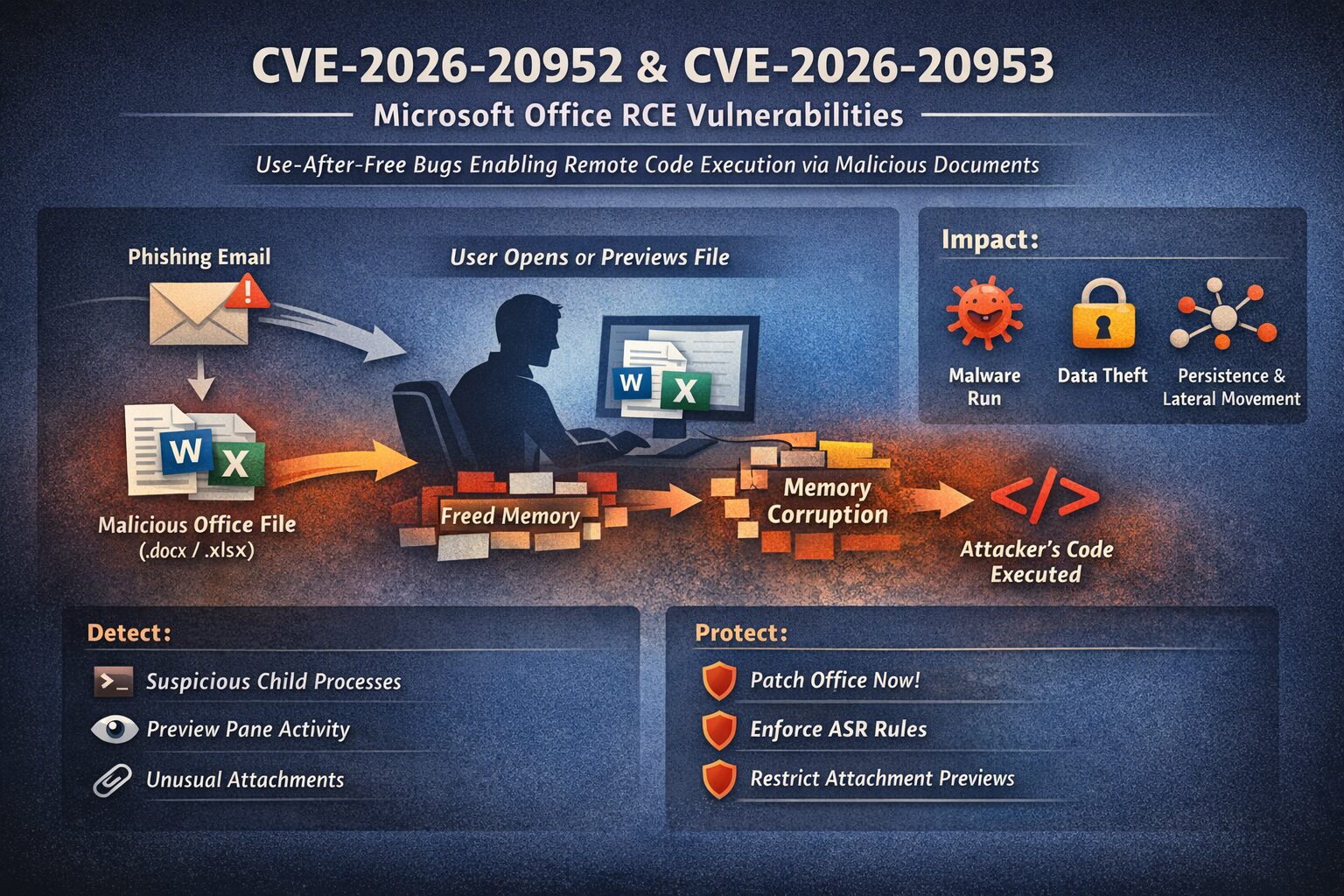
This section explicitly applies to CVE-2026-20952 and CVE-2026-20953, the January 2026 Microsoft Office use-after-free RCE vulnerabilities. Everything below is scoped to these CVEs, not generic Office hardening.
How these specific CVEs work
- CVE-2026-20952 and CVE-2026-20953 are both use-after-free memory bugs in Microsoft Office. A use-after-free flaw happens when the program continues to use memory that has already been freed, leading to unpredictable behavior, which attackers can control to run arbitrary instructions.
Both are rated Critical with a CVSS 3.1 score around 8.4—indicating high impact if exploited and no privileges required on the target system.
How an attacker would exploit them
- The common exploitation scenario for Office document flaws is via malicious file delivery:
- The attacker sends a crafted Office file (e.g., in an email or shared link).
- The victim either opens it or previews it (e.g., in Outlook’s Preview Pane).
- The vulnerable code path in Office parses it and hits the bug, which the attacker manipulates to execute their own code.
How to Look for Exposure to CVE-2026-20952 / CVE-2026-20953
1. Identify vulnerable Office installations
These vulnerabilities exist only on unpatched Office builds prior to the January 13, 2026 security update from Microsoft.
You are exposed if:
- Office has not received January 2026 updates
- The system allows users to open or preview Office documents
- The endpoint processes files from email or external sources
There are no configuration flags that enable or disable this bug. If the patch is missing, the vulnerability exists.
2. Monitor Office execution behavior (primary detection method)
CVE-2026-20952 and CVE-2026-20953 execute inside Office memory, so detection happens after exploitation, not at the crash point.
High-confidence indicators:
WINWORD.EXE,EXCEL.EXE, orPOWERPNT.EXEspawning:cmd.exepowershell.exemshta.exerundll32.exewscript.exe
- Office processes creating or dropping:
- Executables
- DLLs
- Scheduled tasks
- Office writing files into:
%TEMP%%APPDATA%%PROGRAMDATA%
For these CVEs, Office spawning a shell is the red line.
3. Outlook Preview Pane is in scope
Microsoft explicitly notes that previewing a malicious document may be sufficient.
For CVE-2026-20952 / 20953, monitor:
- Outlook attachment preview events
- Immediate Office process activity following preview
- AMSI or EDR alerts tied to
OUTLOOK.EXE→ Office child processes
Preview Pane removes the “user double-click” barrier. Treat it as execution.
4. Email attachment telemetry (pre-exploitation signals)
You will not see CVE-specific signatures. You will see patterns.
Relevant signals for these CVEs:
- DOCX / XLSX files from external senders
- Files that are:
- Previewed but not saved
- Opened once and discarded
- Attachments with:
- Embedded objects uncommon to your environment
- Unusually large internal XML structures
These are delivery indicators, not proof of exploitation—but they narrow the window.
How to Protect Against CVE-2026-20952 / CVE-2026-20953
1. Patch Office (this is the actual fix)
There is no mitigation that fully neutralizes these CVEs without patching.
Required action:
- Apply January 13, 2026 Office security updates
- Validate:
- Click-to-Run clients actually updated
- VDI and gold images were rebuilt
- Confirm version numbers, not just “update succeeded”
If Office is patched, these CVEs are closed.
2. Enforce ASR rules that directly blunt these CVEs
Even though macros are not involved, post-exploitation still relies on process execution.
Strongly recommended:
- Block Office applications from creating child processes
- Block Office from injecting code into other processes
- Block executable content from email and webmail clients
These controls routinely stop payload execution after memory exploitation succeeds.
3. Reduce Preview Pane attack surface
Because previewing can trigger the vulnerable code path:
Options (risk-based):
- Disable automatic preview of Office attachments
- Restrict preview for external senders
- Force download + MOTW tagging before open
This directly reduces exposure to CVE-2026-20952 and CVE-2026-20953.
4. Limit impact with least privilege
Both CVEs execute code as the logged-in user.
Damage reduction controls:
- No local admin for standard users
- Credential isolation (LSASS protections)
- Separate admin workstations
You may still get code execution—but you prevent full domain compromise.
Clear takeaway
- CVE-2026-20952 and CVE-2026-20953 are classic Office document RCEs
- No special conditions, no macros, no privileges required
- If a user can preview or open a document on an unpatched system, the risk exists
- Patching removes the vulnerability; hardening limits blast radius
Remember: if you need to check a phishing link we have the perfect tool for you.
Phishing URL Scanner: Safe & Secure you will be able to get a screenshot and learn about the link in a controlled environment.