
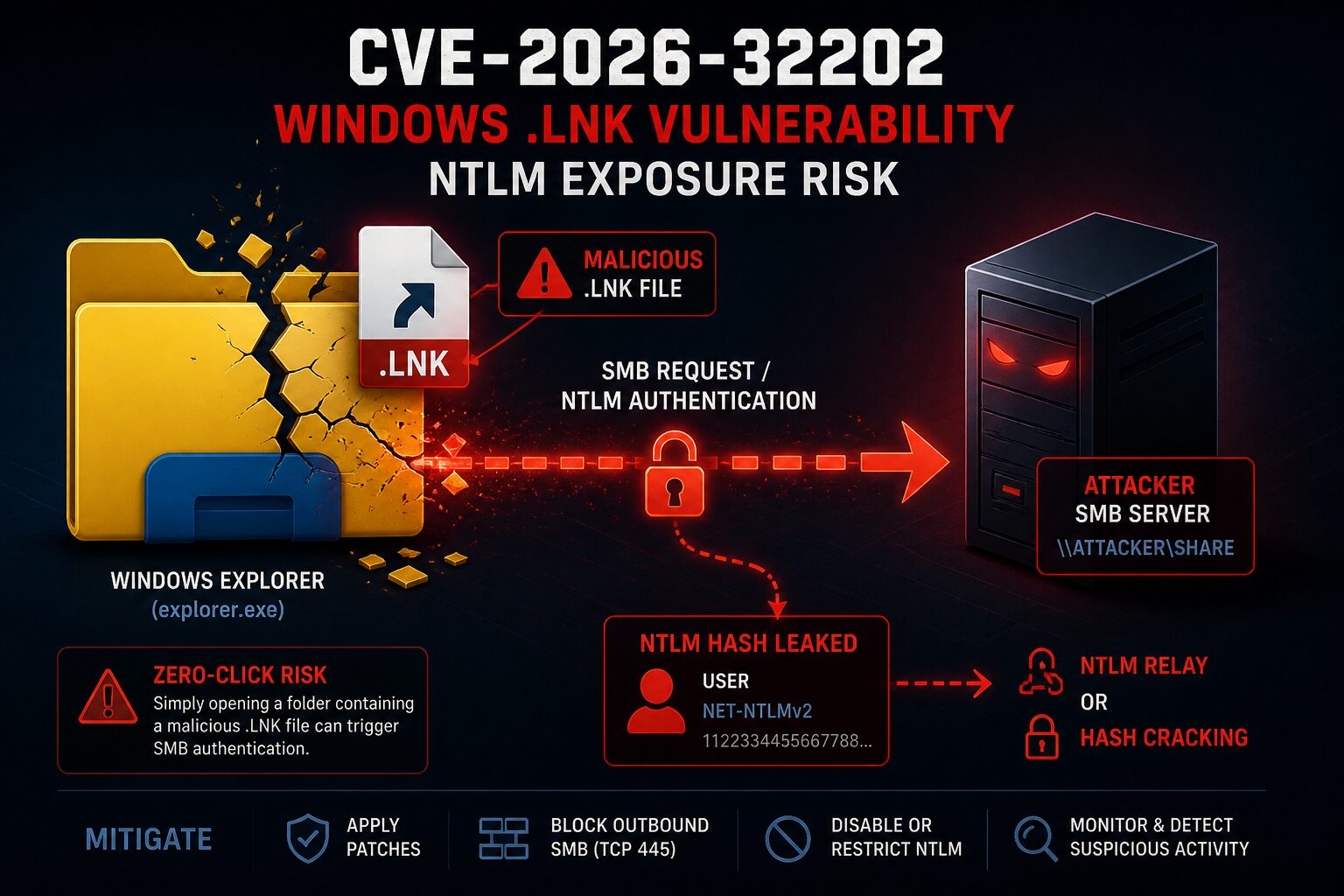
CVE-2026-32202 is a Windows Shell spoofing vulnerability involving protection mechanism failure in Microsoft Windows. NVD lists it as CVSS 4.3 Medium, but that score understates the operational risk — CISA has added it to the Known Exploited Vulnerabilities catalog, which in practice overrides the severity label for patching prioritization purposes.
The core issue is that a malicious Windows shortcut file (.lnk) can cause a victim system to authenticate to an attacker-controlled SMB server, potentially exposing a Net-NTLMv2 hash. Attackers can use that hash for NTLM relay attacks or offline cracking.
Why CVE-2026-32202 Matters
This is not a typical “user double-clicks malware” scenario.
According to Akamai’s findings reported by SecurityWeek, Windows Explorer can trigger the behavior simply by rendering the folder containing the malicious .lnk file. Opening the folder may be enough to cause Windows to fetch shortcut-related resources over SMB — no explicit execution required.
That makes this vulnerability useful across several attack chains:
- Credential theft
- NTLM relay paths
- Initial access staging
- Phishing campaigns
- Network-share or removable-media abuse
CISA added CVE-2026-32202 to the KEV catalog on April 28, 2026, with a remediation due date of May 12, 2026 for covered federal agencies.
Relationship to Earlier .LNK Exploitation
CVE-2026-32202 is not a standalone discovery. Public reporting from SC Media indicates it resulted from an incomplete fix for CVE-2026-21510, where the more severe RCE and SmartScreen bypass behavior was patched, but a remaining authentication-coercion issue persisted.
That distinction matters for accurate scoping:
- CVE-2026-21510 — associated with
.lnkexecution and SmartScreen bypass chains - CVE-2026-32202 — focuses on forced SMB/NTLM authentication exposure
The more accurate framing for this CVE is zero-click NTLM authentication coercion through Windows Shell shortcut handling, not remote code execution.
Critical Warning: Do Not Analyze Suspicious .LNK Files Carelessly
⚠️ Analyst Warning: The wrong PowerShell command or Windows inspection method can accidentally trigger the behavior you are trying to detect. Inspection of .lnk files can become interaction.
.lnk files are not passive artifacts. When Windows resolves shortcut properties, it may:
- Access a remote UNC path
- Fetch an icon from
\\server\share - Initiate outbound SMB traffic
- Trigger NTLM authentication
This can happen without intentionally executing the shortcut.
High-Risk Commands to Avoid
Do not inspect suspicious .lnk files on a production system using:
Start-Process .\suspicious.lnk
Invoke-Item .\suspicious.lnk
Also avoid COM-based shortcut resolution methods:
$Shell = New-Object -ComObject WScript.Shell
$Shortcut = $Shell.CreateShortcut("suspicious.lnk")
$Shortcut.TargetPath
This approach forces Windows to interpret shortcut internals and can trigger outbound SMB authentication.
Recommended Investigation Order
Preferred: Use Microsoft Defender Advanced Hunting First
If Microsoft Defender XDR is available, start with KQL hunting before touching any suspicious .lnk files directly. This lets you detect suspicious file and network behavior without forcing Windows to parse shortcut metadata.
If KQL Is Not Available: Patch and Contain First
- Apply Microsoft security updates for CVE-2026-32202
- Block unnecessary outbound SMB (TCP 445)
- Reduce or disable NTLM where operationally possible — at minimum, disable NTLMv1 and require SMB signing
- Investigate suspicious
.lnkfiles only in an isolated environment with outbound SMB blocked
Defender Advanced Hunting Queries
Find Recently Created .LNK Files
DeviceFileEvents
| where Timestamp > ago(14d)
| where FileName endswith ".lnk"
| project Timestamp, DeviceName, InitiatingProcessAccountName, ActionType,
          FolderPath, FileName, SHA256,
          InitiatingProcessFileName, InitiatingProcessCommandLine
| order by Timestamp desc
Find .LNK Files in Risky User Locations
DeviceFileEvents
| where Timestamp > ago(14d)
| where FileName endswith ".lnk"
| where FolderPath has_any (
    "Downloads",
    "Desktop",
    "Temp",
    "AppData",
    "OneDrive",
    "Teams",
    "Outlook",
    "Content.Outlook"
)
| project Timestamp, DeviceName, InitiatingProcessAccountName,
          FolderPath, FileName, SHA256,
          InitiatingProcessFileName, InitiatingProcessCommandLine
| order by Timestamp desc
Hunt for Explorer Making SMB Connections
DeviceNetworkEvents
| where Timestamp > ago(14d)
| where InitiatingProcessFileName =~ "explorer.exe"
| where RemotePort == 445
| project Timestamp, DeviceName, InitiatingProcessAccountName,
          RemoteIP, RemoteUrl, RemotePort,
          InitiatingProcessCommandLine
| order by Timestamp desc
Prioritize SMB Connections to Public IPs
DeviceNetworkEvents
| where Timestamp > ago(14d)
| where InitiatingProcessFileName =~ "explorer.exe"
| where RemotePort == 445
| where not(ipv4_is_private(RemoteIP))
| project Timestamp, DeviceName, InitiatingProcessAccountName,
          RemoteIP, RemoteUrl, RemotePort
| order by Timestamp desc
Correlate .LNK Activity With Outbound SMB
This is the most useful query for confirming active exploitation attempts. It joins file creation events with network events on the same device within a 10-minute window.
let lnkEvents =
DeviceFileEvents
| where Timestamp > ago(14d)
| where FileName endswith ".lnk"
| project DeviceId, DeviceName, LnkTime=Timestamp,
          LnkPath=FolderPath, LnkName=FileName,
          Account=InitiatingProcessAccountName;

let smbEvents =
DeviceNetworkEvents
| where Timestamp > ago(14d)
| where RemotePort == 445
| where InitiatingProcessFileName in~ (
    "explorer.exe",
    "SearchProtocolHost.exe"
)
| project DeviceId, DeviceName, SmbTime=Timestamp,
          RemoteIP, RemoteUrl,
          Process=InitiatingProcessFileName;

lnkEvents
| join kind=inner smbEvents on DeviceId
| where SmbTime between (LnkTime .. LnkTime + 10m)
| project DeviceName, Account, LnkTime, LnkName, LnkPath,
          SmbTime, Process, RemoteIP, RemoteUrl
| order by SmbTime desc
Safe PowerShell Alternatives
PowerShell is still useful for low-risk file enumeration as long as you treat .lnk files as files and avoid resolving shortcut internals.
Enumerate .lnk files by metadata only:
Get-ChildItem -Path "$env:USERPROFILE\Downloads" -Filter *.lnk -Recurse -ErrorAction SilentlyContinue |
Select-Object FullName, Length, CreationTime, LastWriteTime
Hash a suspicious file without resolving its contents:
Get-FileHash "C:\Path\To\File.lnk"Check for active SMB connections on the live host:
Get-NetTCPConnection -RemotePort 445 -State Established |
Select-Object LocalAddress, LocalPort, RemoteAddress, RemotePort, State,
@{Name="Process";Expression={(Get-Process -Id $_.OwningProcess -ErrorAction SilentlyContinue).ProcessName}},
OwningProcess
⚠️ Do not use PowerShell methods that resolve the shortcut target, icon location, or shell metadata unless you are in an isolated lab with outbound SMB blocked at the network level.
Mitigation Priorities
- Apply Microsoft patches for CVE-2026-32202 (April 2026 update cycle)
- Block outbound SMB — TCP 445 to the internet at minimum; internal segmentation where feasible
- Harden NTLM — disable NTLMv1, require SMB signing, evaluate restricting NTLM where Kerberos is available
- Hunt before you touch — use Defender Advanced Hunting KQL queries before any host-level investigation
- Isolate before inspecting — analyze suspicious shortcuts only in environments with outbound SMB blocked
- Review NTLM authentication logs for unusual or unexpected outbound authentication events
Key Takeaways
CVE-2026-32202 summary: A Windows Shell spoofing vulnerability affecting .lnk shortcut handling. The primary risk is forced SMB/NTLM authentication coercion — not classic RCE. Actively exploited. CISA KEV listed. Patch, block outbound SMB, and hunt with KQL before touching any suspicious files.
- CVE-2026-32202 stems from an incomplete fix for CVE-2026-21510
- Viewing a folder containing a malicious
.lnkmay be sufficient to trigger NTLM exposure - CVSS 4.3 Medium understates real-world risk — treat as high priority based on KEV listing
- Defender Advanced Hunting is the safest first-line detection method
- Careless PowerShell inspection can become exploitation
Sources: NVD, Help Net Security, SecurityWeek, SC Media
Check out more like this: Information Security