
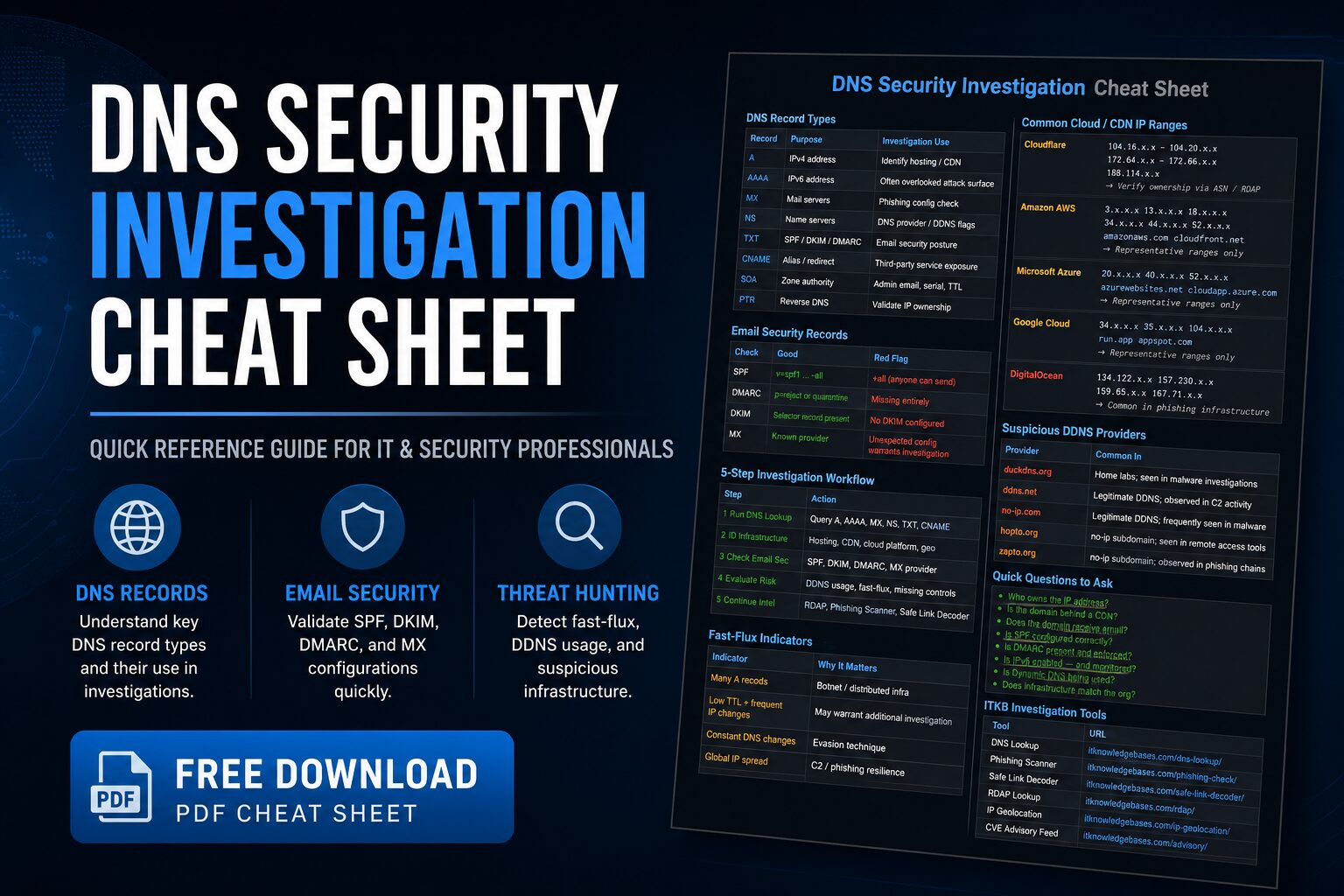
DNS Security Investigation Cheat Sheet resources are useful when analyzing phishing domains, suspicious websites, malware infrastructure, and command-and-control activity. DNS records can quickly reveal hosting providers, email services, cloud platforms, content delivery networks, and security controls that help investigators understand whether a domain deserves deeper review.
If you are new to DNS investigations, start with the full guide: How to Use DNS Lookup for Security Investigations. That article explains the concepts, techniques, and investigation workflow behind this downloadable reference.
Once you understand the basics, use the IT Knowledge Bases DNS Lookup Tool to analyze real domains and compare the results against this cheat sheet.
Download the DNS Security Investigation Cheat Sheet
This downloadable PDF is designed for IT administrators, SOC analysts, incident responders, threat hunters, and security students who need a quick DNS investigation reference during active analysis.
DNS Security Investigation Cheat Sheet
Quick-reference guide covering DNS records, SPF, DKIM, DMARC, fast-flux indicators, cloud infrastructure identification, and phishing investigation workflows.
How to Use This Cheat Sheet
This cheat sheet is a quick-reference companion to our DNS Lookup Security Investigations Guide. The guide explains why DNS records matter during investigations, while this PDF provides a condensed reference you can keep open during phishing analysis, malware triage, or incident response.
When investigating a suspicious domain, use the DNS Lookup Tool to retrieve DNS records, then compare the results against the indicators, record types, and workflow covered in the cheat sheet.
What Is Included in the DNS Security Investigation Cheat Sheet?
The cheat sheet includes practical DNS investigation references for:
- DNS record types and their investigation value
- Email security records including SPF, DKIM, and DMARC
- Fast-flux indicators
- Common cloud and CDN infrastructure clues
- Dynamic DNS providers often seen in investigations
- Quick questions to ask during domain analysis
- Recommended ITKB investigation tools
DNS Record Types Covered
The PDF includes common DNS record types that security analysts review during investigations.
- A Records: IPv4 addresses used to identify hosting providers, CDNs, and infrastructure.
- AAAA Records: IPv6 addresses that may reveal overlooked attack surface.
- MX Records: Mail servers used to evaluate email infrastructure and phishing risk.
- NS Records: Name servers that can reveal DNS providers or Dynamic DNS usage.
- TXT Records: Records often used for SPF, DKIM, DMARC, and verification data.
- CNAME Records: Aliases that may reveal third-party services or cloud platforms.
- SOA Records: Zone authority information including serial and TTL details.
- PTR Records: Reverse DNS records useful when validating IP ownership.
Email Security Checks
Email security records are especially important during phishing investigations. A suspicious domain with weak or unusual mail configuration may warrant additional review.
The cheat sheet highlights important checks such as:
- Whether SPF is configured correctly
- Whether DMARC is present and enforced
- Whether DKIM selector records exist
- Whether MX records align with the expected organization
For example, an SPF record using +all is a major red flag because it permits any sender. A DMARC policy set to p=reject or p=quarantine is generally stronger than having no DMARC record at all.
Fast-Flux and Suspicious DNS Behavior
Fast-flux is a technique used by some botnets, phishing operations, and malicious infrastructure to rapidly rotate IP addresses.
Indicators that may warrant deeper investigation include:
- Many A records
- Low TTL values combined with frequent IP changes
- Constant DNS changes
- Globally distributed IP addresses
Low TTL alone does not prove malicious activity. Many legitimate cloud and CDN services use short TTL values. The concern increases when low TTL values appear with rapid IP rotation, suspicious infrastructure, or other threat indicators.
Cloud and CDN Infrastructure Clues
The cheat sheet includes representative examples for common cloud and CDN providers, including Cloudflare, Amazon AWS, Microsoft Azure, Google Cloud, and DigitalOcean.
These references are not complete IP allocation lists. They are quick context clues. Always verify IP ownership using ASN data, RDAP lookup, or another trusted source before making a final determination.
For example, seeing a Cloudflare IP range may indicate the origin server is hidden behind a proxy. Seeing AWS, Azure, or Google Cloud infrastructure may indicate legitimate SaaS hosting, business applications, or attacker-controlled cloud infrastructure. Context matters.
Quick Questions to Ask During DNS Investigations
The PDF includes practical questions analysts should ask when reviewing DNS records:
- Who owns the IP address?
- Is the domain behind a CDN?
- Does the domain receive email?
- Is SPF configured correctly?
- Is DMARC present and enforced?
- Is IPv6 enabled and monitored?
- Is Dynamic DNS being used?
- Does the infrastructure match the organization?
These questions help reduce missed indicators and keep the investigation focused on infrastructure, email security, and domain behavior.
Recommended Investigation Workflow
- Run a DNS Lookup: Query A, AAAA, MX, NS, TXT, and CNAME records.
- Identify Infrastructure: Review hosting provider, CDN usage, cloud platform, and geography.
- Check Email Security: Review SPF, DKIM, DMARC, and MX records.
- Evaluate Risk: Look for Dynamic DNS usage, fast-flux indicators, missing controls, and suspicious infrastructure.
- Continue Intelligence Gathering: Pivot into RDAP, phishing analysis, safe link decoding, and additional threat intelligence.
Start With the DNS Lookup Tool
Before downloading the cheat sheet, try the IT Knowledge Bases DNS Lookup Tool and examine the DNS records for a domain you manage. Then compare your findings against the investigation techniques outlined in the DNS Security Investigation Guide.
This combination of hands-on analysis and quick-reference material provides a practical workflow for phishing investigations, threat hunting, malware analysis, and incident response.
Related DNS Investigation Resources
- How to Use DNS Lookup for Security Investigations
- DNS Lookup Tool
- RDAP Domain Lookup
- Safe Link Decoder
- Phishing Scanner
- IP Geolocation Lookup
- Security Advisory Feed
Who Should Use This Cheat Sheet?
This DNS Security Investigation Cheat Sheet is designed for:
- IT administrators
- SOC analysts
- Incident responders
- Threat hunters
- Network administrators
- System administrators
- Blue team professionals
- Security students
Use it as a desktop reference, training aid, onboarding resource, or checklist during suspicious domain investigations.
Download the Free PDF
DNS records provide valuable infrastructure intelligence, but knowing what to look for matters. This cheat sheet helps analysts quickly review DNS records, validate email security controls, identify suspicious infrastructure, and continue investigations using related ITKB tools.
Download the DNS Security Investigation Cheat Sheet
Key Takeaways
- DNS records provide fast infrastructure intelligence during investigations.
- The DNS Lookup Tool helps retrieve records for suspicious domains.
- The full DNS security investigation guide explains the workflow in more detail.
- Email records such as SPF, DKIM, DMARC, and MX are critical during phishing investigations.
- Fast-flux indicators may reveal malicious infrastructure.
- Cloud and CDN clues should be verified using ASN or RDAP data.
- DNS analysis works best when combined with RDAP lookup, phishing analysis, and safe link decoding.